In the previous two posts I discussed mostly about the philosophy and attitude of developing with testing.
In this post I give some tips and tools examples for testing.
Tools
JUnit
http://junit.org/
There’s also TestNG, which is great tool. But I have much more experience with JUnit so I will describe this framework.
1. Use the latest version.
2. Know your testing tool!
- @RunWith
This is class annotation. It tells JUnit to run with different Runner (mockito and Spring runners are the most common runners I use)import org.mockito.runners.MockitoJUnitRunner; ... @RunWith(MockitoJUnitRunner.class) public class MyClassTest { ... }@RunWith(SpringJUnit4ClassRunner.class) @ContextConfiguration(locations = { "/META-INF/app-context.xml","classpath:anotherContext.xml" }) public class MyClassTest { ... } // You can inherit AbstractJUnit4SpringContextTests instead of using runner - @Rule
kind of AOP.
The most common out-of-the-box rule, is the TemporaryFolder Rule. It lets you use the file system without worrying about opening and closing files.
An example of Rules can be found here. - Parameterized runner
Really cool tool. It lets you run the same test with different input and different expected output.
It might be abused and make a atest unreadable. - Test Data Preparation and Maintenance Tips
hamcrest
http://hamcrest.org/JavaHamcrest/
This library is “extension” of JUnit.
I can’t work without it 🙂
Hamcrest library gives us out-of-the-box matchers.
Matchers are used with the assertThat(...,Matcher) flavor.
I almost always use this flavor.
(In the previous post, someone suggested that I shouldn’t use assertTrue(…), but instead use assertThat.)
There are plenty type of matchers:
You can verify existing objects in collection ignoring order.
You can check greater than.
The test is more readable using the assertThat + matcher.
assertThat(mapAsCache.containsKey(new CacheKey("valA", "valB")), is(true));
assertThat(cachPairs.size(), is(2));
assertThat(enity.getSomething(), nullValue(Double.class));
assertThat(event.getType(), equalTo(Type.SHOWN));
assertThat(bits, containsInAnyOrder(longsFromUsIndexOne, longsFromUsIndexZero));
You can create your own Matcher. It’s very easy.
Here’s an example of matchers that verify Regular Expressions. https://github.com/eyalgo/junit-additions
mockito
https://code.google.com/p/mockito/
This is the second library I can’t work without.
It lets you mock dependencies of the class under test.
Using mockito you mock dependency.
Then you “tell” the mock object how to behave in certain inputs.
You tell it what to return if some input entered.
You can verify input arguments to a called method.
You can verify that a certain method was called (once, never, 3 times, etc.)
You can check the order of method / mocks calls.
Check this out:
| package eyalgo; | |
| import static org.hamcrest.Matchers.equalTo; | |
| import static org.mockito.Matchers.anyString; | |
| import static org.mockito.Matchers.argThat; | |
| import static org.mockito.Mockito.inOrder; | |
| import static org.mockito.Mockito.mock; | |
| import static org.mockito.Mockito.never; | |
| import static org.mockito.Mockito.times; | |
| import static org.mockito.Mockito.verify; | |
| import static org.mockito.Mockito.verifyNoMoreInteractions; | |
| import static org.mockito.Mockito.verifyZeroInteractions; | |
| import static org.mockito.Mockito.when; | |
| import org.junit.Before; | |
| import org.junit.Test; | |
| import org.junit.runner.RunWith; | |
| import org.mockito.InOrder; | |
| import org.mockito.InjectMocks; | |
| import org.mockito.Mock; | |
| import org.mockito.MockitoAnnotations; | |
| import org.mockito.invocation.InvocationOnMock; | |
| import org.mockito.runners.MockitoJUnitRunner; | |
| import org.mockito.stubbing.Answer; | |
| //The RunWith automatically instantiate fields with @Mock annotation | |
| //and injects to the tested class @InjectMocks | |
| @RunWith(MockitoJUnitRunner.class) | |
| public class NameConnectorTest { | |
| @Mock | |
| private NameConvention nameConventionAsMockField; | |
| @InjectMocks | |
| private NameConnector connector; | |
| private NameConvention nameConventionAsMockOther; | |
| @Before | |
| public void setup() { | |
| //This is another way to inject mocks (instead of the annotations above) | |
| MockitoAnnotations.initMocks(this); | |
| nameConventionAsMockOther = mock(NameConvention.class); | |
| NameConnector otherConnector = new NameConnector(nameConventionAsMockOther); | |
| } | |
| @Test | |
| public void showSomeMockitoExamples() { | |
| NameConvention nameConventionAsMock = mock(NameConvention.class, "Name for this mock"); | |
| // Stub and tell your mock to do something | |
| when(nameConventionAsMock.bigBangConvention("INPUT")).thenReturn("Some output"); | |
| // Throw exception for some input | |
| when(nameConventionAsMock.bigBangConvention("Other INPUT")).thenThrow(new RuntimeException("oops")); | |
| // Do more complicated stuff in the "when" | |
| Answer<String> answer = new Answer<String>() { | |
| @Override | |
| public String answer(InvocationOnMock invocation) throws Throwable { | |
| //do something really complicated | |
| return "some output"; | |
| } | |
| }; | |
| //Show also hamcrest matchers | |
| when(nameConventionAsMock.bigBangConvention(argThat(equalTo("my name is Inigo Montoya")))).then(answer); | |
| // Run the test.. | |
| //Verify some calls | |
| verify(nameConventionAsMock).bigBangConvention("INPUT"); | |
| verify(nameConventionAsMock, times(10)).bigBangConvention("wow"); | |
| // Verify that the method was never called. With any input | |
| verify(nameConventionAsMock, never()).bigBangConvention(anyString()); | |
| verifyNoMoreInteractions(nameConventionAsMock); | |
| verifyZeroInteractions(nameConventionAsMockField); | |
| //Check order of calls | |
| InOrder order = inOrder(nameConventionAsMock, nameConventionAsMockOther); | |
| order.verify(nameConventionAsMock).bigBangConvention("INPUT"); | |
| order.verify(nameConventionAsMock).bigBangConvention("other INPUT"); | |
| } | |
| } |
Other Mocking Tools
- PowerMock and EasyMock
These two are very useful when working with legacy code.
They allow you to test private methods, static methods and more things that you normally can’t.
I think that if you need them, then something is wrong with the design.
However, sometimes you use external libraries with singletons and/or static methods.
Sometimes you work on legacy code, which is not well suited for testing.
On these types of scenarios, then those mocking libraries can help
https://code.google.com/p/powermock/
http://easymock.org/ - JMockit http://jmockit.github.io/
- jMock http://jmock.org/
JBehave
http://jbehave.org/
JUnit, mockito, hamcrest are used for unit tests.
JBehave is not exactly the same.
It is a tool for Behavior-Driven-Development (BDD)
You write stories which are backed up by code (Java) and then you run them.
JBehave can be used for higher level tests, like functional tests.
Using JBehave, it’s easier to test a flow in the system.
It follows the Given, When, Then sequence.
If you take it to the next step, it can be a great tool for communication.
The product owner can write the scenarios, and if all is green, by the end of the iteration, then we passed the definition of done.
cucumber is another BDD tool.
Dependency Injection
In order to have testable code, among other things, you need to practice DI (dependency injection).
The reason is simple:
If you instantiate a dependency in a constructor (or method) of a class under test, then how can you mock it?
If you can’t mock the dependency, then you are bound to it. And you can’t simulate different cases.
Many application have Spring as the DI container, but less developers take the advantage of using the injection for testing.
Metrics
Use SONAR in your CI environment.
Check code coverage using cobertura or other tools.
Use Jenkins / Hudson / Other CI tool for automation.
IDE
Your IDE can help you writing tests.
For eclipse, I have two recommendations:
- MoreUnit is cool plugin that helps writing tests faster.
- In eclipse, CTRL+Space can give you hints and fill imports. But not static imports.
Most (all?) libraries use static imports.
So you can add the testing libraries as favorites and then eclipse will fill them for you.
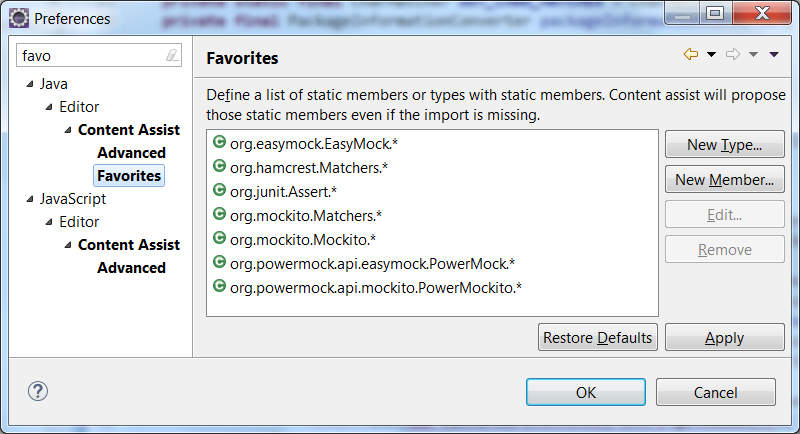
eclipse favorites
POM
Here’s part of POM for testing libraries.
| <build> | |
| <plugins> | |
| <plugin> | |
| <groupId>org.apache.maven.plugins</groupId> | |
| <artifactId>maven-compiler-plugin</artifactId> | |
| <configuration> | |
| <source>1.8</source> | |
| <target>1.8</target> | |
| </configuration> | |
| </plugin> | |
| <plugin> | |
| <groupId>org.apache.maven.plugins</groupId> | |
| <artifactId>maven-jar-plugin</artifactId> | |
| <configuration> | |
| <archive> | |
| <addMavenDescriptor>false</addMavenDescriptor> | |
| </archive> | |
| </configuration> | |
| </plugin> | |
| <plugin> | |
| <groupId>org.apache.maven.plugins</groupId> | |
| <artifactId>maven-source-plugin</artifactId> | |
| <executions> | |
| <execution> | |
| <goals> | |
| <goal>jar-no-fork</goal> | |
| </goals> | |
| </execution> | |
| </executions> | |
| </plugin> | |
| <plugin> | |
| <artifactId>maven-assembly-plugin</artifactId> | |
| <configuration> | |
| <archive> | |
| <manifest> | |
| <mainClass>com.startapp.CouchRunner.GetUserProfile</mainClass> | |
| </manifest> | |
| </archive> | |
| <descriptorRefs> | |
| <descriptorRef>jar-with-dependencies</descriptorRef> | |
| </descriptorRefs> | |
| </configuration> | |
| </plugin> | |
| </plugins> | |
| </build> |
You can use profiles to separate unit testing with integration tests.


